Why Law Firms Need CRM for Client Intake: A Partner's Guide

A modern CRM is essential for law firm client intake. It centralizes every lead, shrinks response time, prevents conflicts, and converts more inquiries into signed retainers — and firms that treat it as a strategic growth platform rather than a digital Rolodex see measurable revenue gains.
- Centralization: Every call, form submission, email, and chat lands in one timeline instead of scattered inboxes.
- Faster response: Automated follow-up reaches prospects within minutes, not days — when conversion probability is still high.
- Conflict prevention: Integrated conflict checks flag potential issues before an attorney invests time in a consultation.
The shift is real: industry coverage from the Marketing Partner Forum frames CRM as moving from a contact list to an AI-enabled business-development engine — one that ties marketing spend directly to retained matters.
CLIENTSFirst Consulting CRM surveys consistently identify attorney buy-in and bad data as the top barriers to realizing that potential. Omnivancemedia works with law firms to close exactly that gap.
Key Takeaways
Law firms that implement CRM for client intake with proper governance, e-signature integration, and attorney adoption tactics convert more leads into retained matters from the same marketing spend.
| Point | Details |
|---|---|
| CRM centralizes intake | Every lead source (forms, calls, email, chat) feeds one timeline, eliminating lost contacts. |
| E-signature shortens retainer time | Approximately 90% of fee agreements can be executed via integrated e-signature, cutting days to minutes. |
| Adoption drives ROI | Attorney buy-in and data quality, not software choice, determine whether CRM delivers measurable results. |
| Pilot before firm-wide rollout | A focused 4–8 week pilot on one practice area produces reliable baseline data and reduces rollout risk. |
| Omnivancemedia as implementation partner | Omnivancemedia combines CRM setup, paid media, and analytics to connect marketing spend directly to retained matters. |
Table of Contents
- Why law firms need CRM for client intake: the operational case
- What intake-specific CRM features does your firm actually need?
- What AI and automation practically add to intake
- Why CRM projects fail, and how to prevent it
- How do you measure whether CRM actually improved intake?
- Implementation checklist: select, pilot, launch, and govern
- What the evidence actually shows about CRM adoption in law firms
- How do you choose the right CRM vendor for intake?
- The real trade-off most firms miss
- Omnivancemedia helps law firms build intake systems that actually convert
- Sources
Why law firms need CRM for client intake: the operational case
The core benefit is simple: a CRM-driven intake converts more of the leads you already paid to generate. Without one, a potential client who fills out a web form at 9 PM on a Friday may not hear back until Monday — and by then, they have already retained someone else.
A legal CRM pulls every touchpoint (web forms, phone calls, live chat, email) into a single contact timeline. Attorneys and intake staff see the full picture before the first consultation. Legal-first platforms go further by preserving matter-centric organization from the moment a lead enters the pipeline. This way, nothing gets lost in translation when a prospect becomes a client.
Response speed is the most direct lever. Disorganized intake loses leads between first contact and signed retainer — a gap that CRM-automated follow-up closes by triggering an immediate acknowledgment and scheduling a callback without any manual step.
Pro Tip: Set your CRM's first-response automation to fire within five minutes of a form submission. That window is when a prospect is most engaged and least likely to have contacted a second firm.
The downstream business impacts compound quickly:
- Higher intake-to-retainer conversion rate
- Reduced time from first contact to signed agreement
- Cleaner marketing attribution (you know which channel produced which retained matter)
- Fewer leads falling through the cracks during staff transitions or high-volume periods
What intake-specific CRM features does your firm actually need?
Not every CRM is built for legal work. General sales CRMs lack conflict-check logic, matter linkage, and the security posture attorneys require. These are the non-negotiable intake features to put in any RFP:
- Web intake forms: Customizable, embeddable forms that capture case type, contact details, and initial facts — feeding directly into the CRM pipeline without manual re-entry. Clio's contact management and platforms like MyCase both offer legal-specific field sets.
- Triage rules and pipelines: Automated routing that assigns a lead to the right practice area and attorney based on form responses.
- Conflict-check integration: A flag that cross-references new contacts against existing matters before a consultation is scheduled.
- Secure client portal: Encrypted document exchange and messaging that satisfies confidentiality obligations from day one.
- E-signature: Approximately 90% of fee agreements can be executed through integrated e-signature software, cutting the time between consultation and signed retainer from days to minutes.
- Matter linkage: A direct handoff from the CRM record to the case management system so intake data populates the matter file automatically.
Pro Tip: Ask vendors whether conflict checking runs against the CRM contact database or requires a manual export to your case management system. A real-time, in-system check is the only version that actually prevents the problem.
What AI and automation practically add to intake
AI and automation reduce manual entry and surface high-probability leads before an attorney has to ask. The use cases that deliver the most immediate value in a legal intake context:
- Auto-capture from email and forms: The CRM reads incoming emails and form submissions, creates or updates contact records, and logs the interaction — no staff action required.
- Relationship intelligence: AI scans communication patterns to flag warm referral sources and prior clients who have re-engaged, so attorneys can prioritize outreach.
- Automated triage and task creation: When a lead meets predefined criteria (case type, geography, matter value), the system creates a follow-up task and assigns it to the right person.
- Smart reminders and payment follow-ups: Automated nudges for unsigned retainer agreements or outstanding intake documents keep the pipeline moving without staff chasing.
The Marketing Partner Forum's coverage of AI in legal CRM notes that firms using AI-assisted data capture see fewer gaps in contact records — which directly improves the quality of every downstream report and attribution model.
Risk mitigation matters here. AI-generated lead scores can produce false positives; a human intake specialist should review any automated triage decision before a consultation is declined. Data privacy obligations under state bar rules and applicable privacy statutes require that any AI tool processing client communications be covered by a vendor data-processing agreement. Governance checkpoints:
- Define which data fields AI may read and write
- Log every automated action for audit purposes
- Review AI triage accuracy monthly and adjust scoring rules
Pro Tip: Start AI automation with one low-risk use case — auto-capture from web forms — before enabling lead scoring. That sequence builds staff confidence and gives you clean baseline data to train the scoring model.
Why CRM projects fail, and how to prevent it
Failure usually comes from people and process, not the software. Industry surveys and vendor analysis confirm that many firms own a CRM but use it poorly — attorneys log calls inconsistently, data decays, and the system becomes a liability rather than an asset.
Common failure causes:
- Low attorney usage: Attorneys see CRM as administrative overhead, not a tool that helps them.
- Poor data hygiene: Duplicate contacts, missing fields, and stale records undermine every report and automation.
- No governance: Nobody owns the data quality process or enforces entry standards.
- No incentives: Adoption is mandated but never tied to performance metrics attorneys care about.
Concrete mitigation tactics leadership can act on today:
- Integrate the CRM with the tools attorneys already use (Outlook, Gmail, calendar) so logging happens passively.
- Build quick wins for attorneys: a dashboard showing their pipeline value and referral source performance makes the system personally useful.
- Assign a CRM champion in each practice group who owns data quality and reports adoption metrics to leadership monthly.
- Keep required fields to a minimum at launch. Five well-filled fields beat twenty empty ones.
Pro Tip: Frame CRM adoption to attorneys as a business development tool, not a reporting requirement. Show one attorney their referral source data in the first week — that story spreads faster than any training session.
How do you measure whether CRM actually improved intake?
Lead with the core KPI set, then build the measurement infrastructure around it:
- Intake conversion rate: Leads that become signed retainers ÷ total leads. Measure from CRM pipeline data.
- Time-to-intake: Minutes from first contact to first staff response. Pull from CRM activity timestamps.
- Time-to-retainer: Days from first contact to signed fee agreement. CRM + e-signature logs.
- Revenue per matter: Average retainer value by practice area. CRM + billing system join.
- Intake-to-retainer rate by channel: Which marketing channel produces the highest-converting leads. CRM + UTM tracking.
At an average retainer of $4,000, that is $20,000 in incremental monthly revenue — $240,000 annually — from the same marketing spend. Measuring that attribution precisely requires CRM data connected to your billing system.
For law firm digital marketing, CRM data also tells you which paid channels and content types produce the highest-value matters, letting you reallocate budget toward what actually converts.
Implementation checklist: select, pilot, launch, and govern
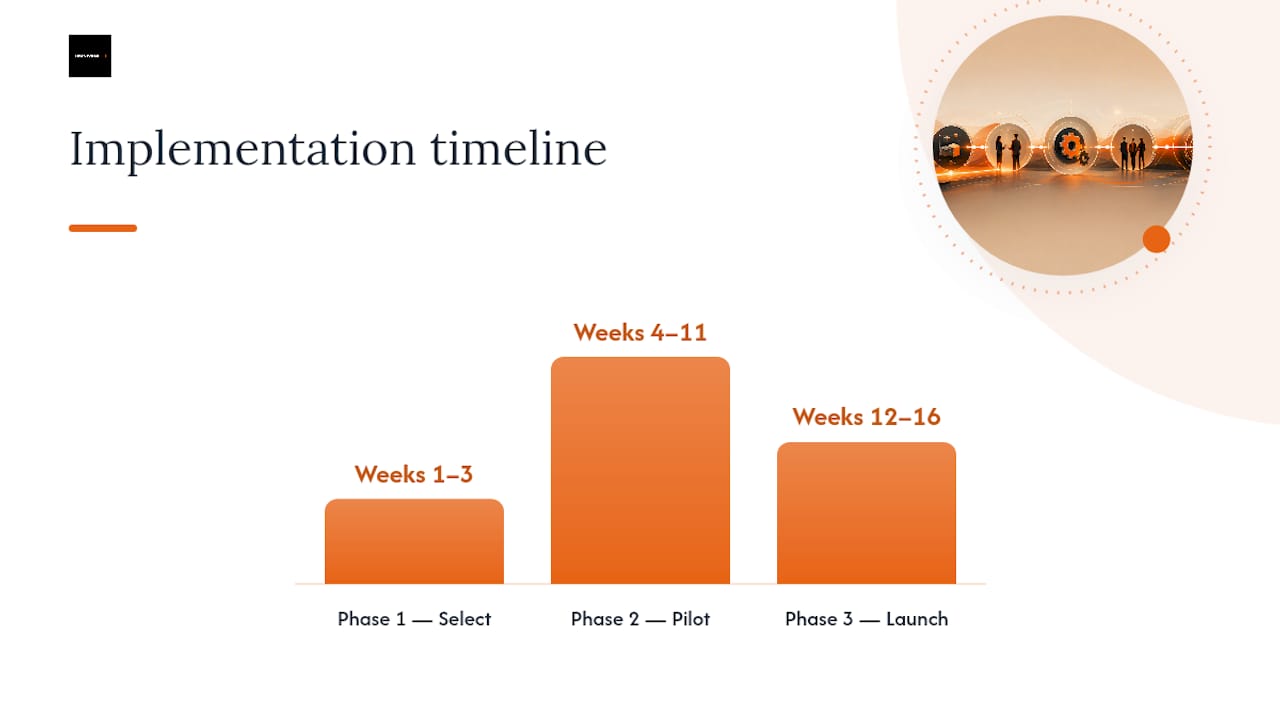
Follow this phased checklist to reduce risk and maximize adoption. The intake.link conversion guide and Law.com's intake operations analysis both point to a focused, staffed intake workflow as the difference between CRM as a cost center and CRM as a revenue driver.
Phase 1: Select (weeks 1–3)
- Document current intake workflow and identify the three biggest drop-off points.
- Build an RFP with the feature checklist from Section 3 above.
- Require vendors to demonstrate conflict-check integration and e-signature in the demo.
- Confirm data migration path from your existing system.
Phase 2: Pilot (weeks 4–11)
- Choose one practice area with a defined lead volume (personal injury or family law work well).
- Run a 4–8 week pilot with a small intake team and one supervising attorney.
- Track time-to-intake and conversion rate weekly against your pre-CRM baseline.
- Use AI-ready intake form design to ensure web forms feed the CRM cleanly from day one.
Phase 3: Launch (weeks 12–16)
- Roll out firmwide with practice-group champions in place.
- Run a two-hour training session focused on the five daily actions attorneys need to take.
- Integrate with case management, billing, and calendar systems to eliminate double entry.
Phase 4: Govern (ongoing)
- Assign a CRM administrator who reviews data quality monthly.
- Report adoption KPIs (logins, records updated, tasks completed) to firm leadership quarterly.
- Review AI triage rules and lead-scoring accuracy every 90 days.
Pro Tip: Pilot scope matters more than pilot duration. A focused 4–8 week pilot on one practice area with clean baseline data tells you more than a six-month firm-wide soft launch with no controls.
What the evidence actually shows about CRM adoption in law firms
The trend across surveys and operational analyses is consistent: firms recognize CRM's value but underdeliver on execution. Industry commentary from Law.com frames the gap clearly — attorney buy-in and bad data are the top barriers, and governance plus automation-assisted capture are the fixes that move the needle.
Firms that treat intake as a staffed, process-driven function — not a passive form on a website — convert their marketing spend into retained matters at a measurably higher rate. A dedicated intake role, CRM automation, and e-signature together form the operational core that makes that possible.
Key evidence points:
- CasePeer's analysis confirms that a single source of truth across contacts and interactions is the foundation of effective relationship management — and that most firms are not there yet.
- The Law.com intake operations piece recommends at least one dedicated intake staff member per firm and e-signature integration as the two highest-ROI operational changes.
- Omnivancemedia's client work demonstrates the pattern at scale: an integrated approach combining CRM automation, paid advertising, and SEO has produced documented revenue growth for service-based businesses — including a client moving from $80K to $420K in monthly revenue through coordinated intake and marketing systems.
How do you choose the right CRM vendor for intake?
Focus vendor selection on integration depth, intake-specific features, data security, and adoption support. Legal-first CRM design matters because general sales CRMs were built for B2B pipelines, not matter-centric legal workflows.
Ten questions to ask every vendor in a demo or RFP:
- Does conflict checking run in real time within the CRM, or does it require a manual export?
- Can intake forms be embedded on our website and feed directly into the pipeline without manual re-entry?
- Is e-signature natively integrated or a third-party add-on requiring a separate subscription?
- How does the CRM hand off a converted lead to our case management system?
- What automation rules can we configure without developer support?
- What reporting is available for intake conversion rate and time-to-retainer out of the box?
- How is client data encrypted at rest and in transit, and what is your SOC 2 status?
- What does data migration from our current system cost and how long does it take?
- Is there a mobile app that lets attorneys log calls and update records from their phones?
- What does the implementation and onboarding support package include, and is ongoing support included in the subscription?
On pricing: subscription models typically run per-user per-month, with implementation fees billed separately. Budget for integration work (connecting to your case management and billing systems) as a line item — it is rarely included in the base subscription and is often where projects go over budget.
The real trade-off most firms miss
The conventional wisdom says the hard part of CRM is choosing the right software. It is not. The hard part is getting attorneys to use it consistently enough that the data is worth trusting.
Every CRM vendor will show you a polished demo with clean pipelines and beautiful dashboards. What they will not show you is what the system looks like after six months of inconsistent logging — duplicate contacts, missing matter values, and conversion reports that mean nothing because half the intake records were never updated.
The firms that get real ROI from CRM do one thing differently: they treat data quality as a leadership responsibility, not an IT task. A managing partner who asks for the intake conversion report in every monthly meeting creates more adoption than any training program. Attorneys log what gets measured. They ignore what does not.
Start small, measure obsessively, and scale what works. A 4–8 week pilot on one practice area with clean baseline data will tell you more about your firm's actual intake performance than any vendor case study.
Omnivancemedia helps law firms build intake systems that actually convert
Law firms that have invested in marketing but are still losing leads between first contact and signed retainer have a process problem, not a traffic problem. Omnivancemedia solves it by combining CRM setup and automation with the paid media, SEO, and AEO infrastructure that feeds the intake pipeline in the first place.

The work covers requirements mapping, vendor selection support, pilot execution, CRM-to-case-management integration, and the analytics layer that connects marketing spend to retained matters. For firms running Google or Meta campaigns, Omnivancemedia's paid advertising services connect directly to CRM tracking so every dollar of ad spend is attributed to a matter outcome. The result is a system where intake, marketing, and revenue reporting all speak the same language.
To see how this applies to your firm's intake workflow, request a CRM strategy session with the Omnivancemedia team.
Sources
- CRM as a growth strategy: turning AI and data into business development success
- Clio — contact management features
- What is the Best CRM for Lawyers? A 2026 Guide
- Intake
- Five reasons you need legal CRM software — Casepeer
- Law