Paid Advertising for E-Commerce Explained for Store Owners

Paid advertising for e-commerce is a coordinated system of platform buys across Google Ads, Meta Ads, TikTok, and Amazon that captures existing buyer demand and creates new demand simultaneously. Before you spend a dollar, set up verified tracking and a margin-aware KPI framework. Without those two things, you're flying blind regardless of budget.
Table of Contents
- Which paid channels should you actually use for e-commerce?
- How paid advertising actually works (auctions, bids, and signals)
- Tracking setup: what you must do before spending anything
- Campaign types and when to use each one
- Creative strategy and testing for Meta ASC and TikTok
- How to set budgets, ROAS targets, and KPIs that actually matter
- Attribution and measurement in 2026: what's broken and how to fix it
- Common mistakes and how to fix them fast
- How Omnivancemedia approaches e-commerce paid advertising
- What e-commerce advertisers need to know about ad policies
- Key Takeaways
- What actually separates scaling brands from stalled ones
- Omnivancemedia's paid advertising service for e-commerce brands
- Useful sources and further reading
Which paid channels should you actually use for e-commerce?
The Google vs. Meta question is the wrong frame. High-performing DTC brands use Google to capture intent and Meta to create it. Every other channel is additive once those two are working.
| Channel | Best For | Intent Level | Ad Formats | Measurement Complexity | Typical Cost Signal | Creative Needs |
|---|---|---|---|---|---|---|
| Google Shopping / PMax | Demand capture | High | Product feed, text, video | Medium | CPC ~$1.04 avg (hard goods) | Feed quality, asset groups |
| Meta Advantage+ (ASC) | Discovery, prospecting | Low–Medium | Image, video, catalog | Medium–High | CPM ~$14.20 (Q2 2026) | |
| High volume, UGC, video | ||||||
| TikTok Ads | Trend-driven, younger demos | Low | Short-form video | Medium | Variable | Native-feel video, fast iteration |
| Amazon Sponsored Products | Marketplace sellers | Very High | Product listing | Low–Medium | ACoS-based | Product images, copy |
| Pinterest / YouTube | Secondary awareness | Low | Visual, video | Low | Lower CPM | Lifestyle, brand video |
Stage-based starter recommendation:
- Under $500K ARR: Start with Google Shopping only. Feed quality and conversion tracking first.
- $500K–$5M ARR: Add Meta Advantage+ Shopping Campaigns (ASC) once Google is profitable. Run both in coordinated roles.
- $5M+ ARR: Layer in TikTok for discovery, Amazon if you sell on marketplace, and invest in creative ops as a recurring function.
How paid advertising actually works (auctions, bids, and signals)
Every ad platform runs an auction-based system where your bid, predicted response rate, and ad quality combine to determine placement and cost. You don't just buy a slot. You compete for it in real time, and the platform's algorithm weights your creative quality and audience signal strength as heavily as your bid.
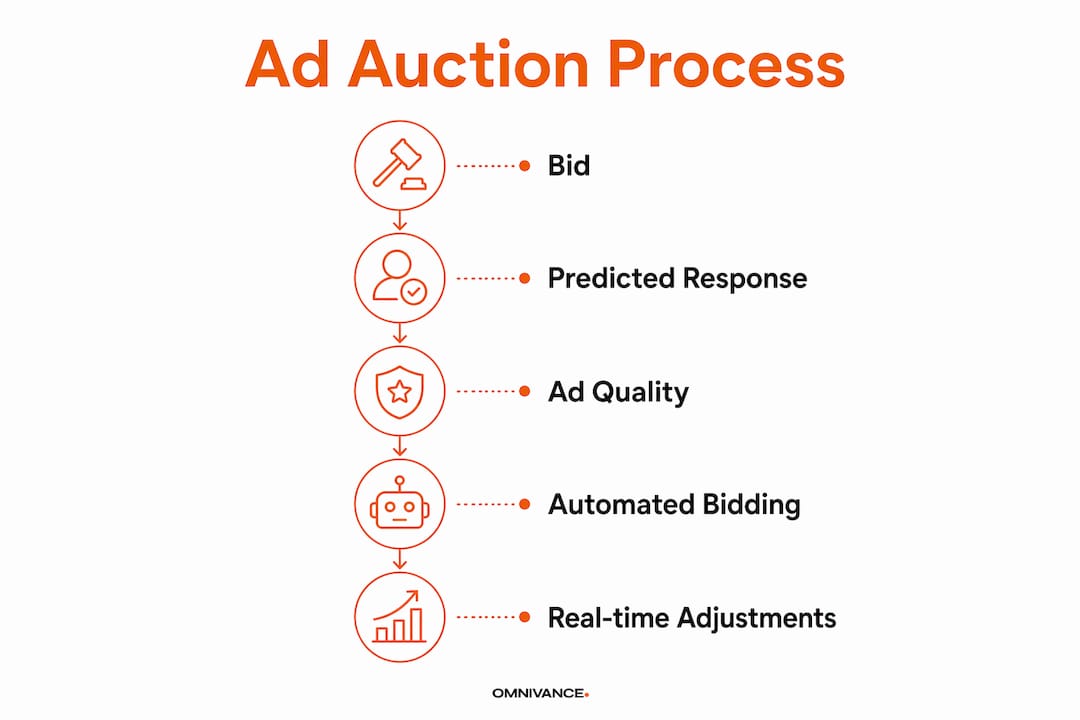
Automated bidding strategies like Target ROAS (tROAS) and Google's Maximize Conversion Value adjust bids in real time based on signals the platform collects. Meta's Advantage+ does the same, dynamically allocating budget toward the audiences and creatives most likely to convert. Manual controls still matter for brand campaigns and top-performing product segments where you want bid floors.
Audience signals are what feed these systems. Your Meta pixel, Google tag, server-side Conversions API (CAPI), customer match lists, and first-party purchase data all improve match quality. Better signals mean the algorithm finds buyers faster and wastes less spend on unqualified traffic.
Key signal inputs that affect auction outcomes:
- Pixel / Google tag (browser-side events)
- Server-side CAPI or GTM server container (fills iOS gaps)
- Customer match lists (email, phone)
- Product feed quality (titles, attributes, pricing)
- Historical conversion data (the more, the better)
Pro Tip: Set up server-side CAPI before you launch Meta campaigns. Pixel-only setups miss an estimated 40% of purchase events on iOS Safari, which starves the algorithm of the data it needs to optimize.
Tracking setup: what you must do before spending anything
Tracking is non-negotiable. Install and verify every event before you run a single ad.
- Install platform tags: Meta pixel via Events Manager, Google tag via Google Tag Manager or direct implementation on your Shopify store.
- Implement server-side events: Deploy Meta CAPI or a GTM server container to route purchase events server-side, bypassing browser privacy restrictions.
- Map primary conversion events: Purchase (with order value), add-to-cart, checkout-start. Pass product-level revenue and, where possible, margin.
- Verify event fidelity: Use Meta's Test Events tool and Event Match Quality score. Use Google's Tag Assistant and debug view. Run a test purchase and confirm it fires correctly.
- Cross-reference with Shopify: Pull a sample of orders from your Shopify dashboard and confirm the same transactions appear in your ad platform reports. Discrepancies above 10–15% signal a tracking problem.
Verification checklist before go-live:
- Meta Event Match Quality score above 6.0
- Google conversion actions showing "Recording conversions"
- Server-side events firing alongside browser events (not instead of)
- Purchase event passing transaction value, not just a static $1 placeholder
Pro Tip: Run daily event count checks for the first two weeks. Keep a one-page tracking runbook that documents each tag, its trigger, and who owns it. When something breaks at 11 PM before a sale launch, you'll be glad it exists.
Campaign types and when to use each one
Google Shopping and Performance Max handle high-intent capture. PMax blends Shopping, Search, Display, and YouTube into one campaign and allocates budget automatically across surfaces. Meta ASC handles creative-driven discovery. Search campaigns protect your brand name and conquer competitor queries. TikTok reaches younger, trend-responsive audiences. Amazon Sponsored Products are the foundation for marketplace sellers, with ACoS targets typically in the 15–30% range depending on margin.

| Campaign Type | Funnel Stage | Creative Needs | Min. Monthly Budget (approx.) | Measurement Complexity |
|---|---|---|---|---|
| Google Shopping / PMax | Bottom | Product feed, asset groups | — | Medium |
| Meta ASC (Advantage+) | Top–Mid | 10+ creative variants | — | Medium–High |
| Branded Search | Bottom | Text ads | $500+ | Low |
| TikTok Ads | Top | Native short-form video | — | Medium |
| Amazon Sponsored Products | Bottom | Product images, copy | — | Low–Medium |
| Retargeting (Meta DPA / PMax) | Mid–Bottom | Dynamic catalog, video | — | Medium |
Budget allocation for a brand spending $20,000–$100,000/month: 35–45% to Google Shopping/Search, 25–35% to Meta, 10–20% to Amazon if applicable, 5–15% to TikTok, and 5–10% to programmatic retargeting. Treat early spend as tuition for the algorithm. Data stabilizes over weeks, not days.
Creative strategy and testing for Meta ASC and TikTok
Creative is the primary competitive lever on discovery platforms. The algorithm finds the audience. Your job is to give it enough material to work with.
- Establish a creative hypothesis for each test: what hook, format, or CTA are you testing, and what outcome defines a winner?
- Run 4–10 new concepts per month inside ASC. Advertisers running 10+ active variants saw 23% lower CPMs than those running three or fewer.
- Maintain a minimum asset library: short video cuts (6–15 seconds), lifestyle imagery, product-on-white, and UGC-style content.
- Rotate winners every 3–4 weeks. Creative fatigue on Meta is real and measurable via rising CPMs and falling CTR.
- Track creative performance signals weekly: thumb-stop rate, hook rate, cost per purchase by creative.
For ads insights that actually move the needle, the consistent finding is that UGC-style video outperforms polished production on Meta and TikTok for most e-commerce categories. Invest in volume and iteration, not just production quality.
How to set budgets, ROAS targets, and KPIs that actually matter
Set ROAS targets from gross margin, not revenue. A 2.0x ROAS on revenue with a 55% gross margin means you're generating $1.10 in gross profit per $1 spent before overhead, shipping, and returns. That's the math that determines whether a campaign is profitable or just busy.
Sample margin-adjusted ROAS calculation:
| Gross Margin | Break-Even ROAS (Revenue) | Margin-Adjusted ROAS Equivalent |
|---|---|---|
| 40% | 2.5x | 1.0x |
| 55% | 1.8x | 1.0x |
| 60% | 1.67x | 1.0x |
Use Marketing Efficiency Ratio (MER = total revenue ÷ total ad spend across all channels) as your north-star metric. Platform-reported revenue can diverge from actual revenue by 15–30% due to attribution window differences. MER cuts through that noise.
Bidding and budget rules by stage:
- Proof of concept ($1,500–$5,000/month): Manual CPC or low tROAS. Goal is finding creatives and confirming conversion tracking, not efficiency.
- Efficiency building ($5,000–$20,000/month): Switch to tROAS once you have 15–20 conversions per campaign per month. Increase budgets by no more than 20% per week to avoid resetting the learning phase.
- Scaling ($20,000+/month): Raise tROAS targets gradually. Use MER as the guardrail. Add channels only after core channels are stable.
Attribution and measurement in 2026: what's broken and how to fix it
Attribution gaps are real. Fix measurement with server-side CAPI and blended MER tracking before trusting any platform's reported numbers.
iOS privacy changes and browser-level restrictions have degraded pixel-only tracking significantly. The result is underreported conversions in Meta Ads Manager, inflated CPAs, and misallocated budgets. Brands that deployed server-side CAPI report event-match improvements and ROAS figures that align more closely with actual revenue.
Mitigation checklist:
- Deploy server-side CAPI (Meta) and Google Tag Manager server container
- Set attribution windows consistently across platforms (7-day click is standard for Meta)
- Track MER weekly in a simple spreadsheet: total revenue ÷ total ad spend
- Run a geo holdout or conversion lift study within 90 days to validate channel contribution
- Use Shopify's built-in analytics as a ground-truth revenue source, not platform dashboards
Incrementality testing options:
- Geo holdout: Pause ads in one market for 2–4 weeks, compare revenue lift vs. control markets.
- Meta Conversion Lift Study: Available in Ads Manager; measures true incremental conversions.
- Google Campaign Experiments: A/B test bidding strategies or campaign structures with statistical confidence.
Common mistakes and how to fix them fast
The biggest mistakes e-commerce teams make:
- Running ads without verified tracking (you're optimizing to noise)
- Setting ROAS targets from revenue benchmarks instead of gross margin
- Creative starvation on Meta ASC (fewer than five active variants)
- Over-fragmented account structure (too many campaigns, too little data per campaign)
- Neglecting feed quality for Google Shopping — poor titles and missing attributes waste spend
Rapid troubleshooting by symptom:
- Falling ROAS: Check for creative fatigue first (rising CPM, falling CTR). Then audit feed titles and negative keywords.
- Rising CPCs: Review search term reports for irrelevant matches. Tighten negative keyword lists.
- Flat conversions despite traffic: Check landing page load speed, mobile UX, and whether the conversion event is firing correctly.
- Ad disapprovals: Review platform policies for your product category. Restricted categories (supplements, certain health claims, financial products) require pre-approval or modified ad copy. Check compliance considerations for paid social before launching in sensitive verticals.
How Omnivancemedia approaches e-commerce paid advertising
Omnivancemedia runs a tracking-first, margin-aware playbook that coordinates Google and Meta in distinct roles, with creative ops and feed engineering as recurring operational functions.
Client outcomes:
- An e-commerce client scaled from $80K to $420K in monthly revenue through coordinated paid advertising, CRM automation, and creative production working as one system.
- A service business generated $340K in new contracts within 90 days using the same integrated approach.
Methodology summary:
- Tracking audit and server-side CAPI setup before any spend
- Margin-adjusted ROAS targets and MER as the primary performance guardrail
- Google Shopping / PMax for demand capture, Meta ASC for discovery
- Weekly feed optimization cycles and monthly creative refreshes
- Incrementality testing at 90 days to validate channel contribution
What e-commerce advertisers need to know about ad policies
Every major platform maintains a restricted products list, and violations result in ad disapprovals, account suspensions, or permanent bans. Google, Meta, TikTok, and Amazon each enforce their own policies, and they differ in meaningful ways.
Categories that commonly trigger disapprovals include supplements and health claims, financial products, weapons and related accessories, adult content, and certain beauty or cosmetic claims. Before launching in any of these verticals, review the platform's specific policy page and, where required, complete a pre-authorization process.
For Google Shopping, product disapprovals at the feed level can silently remove products from serving without triggering an account-level alert. Audit your Merchant Center diagnostics weekly. For Meta, ad-level disapprovals often stem from landing page content, not just ad copy, so your product pages need to comply as well.
A practical rule: if your product makes a claim that would require FDA review on a label, assume it needs policy review before it runs as ad copy.
Key Takeaways
Paid advertising for e-commerce works when tracking is verified, ROAS targets are set from gross margin, and Google and Meta operate in coordinated roles rather than competing for the same budget.
| Point | Details |
|---|---|
| Tracking before spend | Install pixel, server-side CAPI, and verify purchase events before launching any campaign. |
| Margin-adjusted ROAS | At 55% gross margin, a 1.8x revenue ROAS equals 1.0x margin — set targets from your actual numbers. |
| Channel coordination | Google Shopping captures high-intent demand; Meta ASC creates discovery-driven demand. Run both. |
| Creative volume on Meta | Running 10+ active variants in ASC drives 23% lower CPMs than running three or fewer. |
| Omnivancemedia | Omnivancemedia's integrated system scaled one e-commerce client from $80K to $420K monthly revenue. |
What actually separates scaling brands from stalled ones
The conventional wisdom says "test more channels." What actually works is going deeper on fewer channels with better infrastructure. Every scaling brand Omnivancemedia works with shares the same pattern: clean tracking, margin-aware targets, and a creative production cadence that keeps Meta ASC fed.
Two heuristics worth testing in your own account: First, if your MER drops when you pause Meta but your Google ROAS stays flat, Meta is generating demand that Google is capturing credit for. Don't cut Meta. Second, feed quality on Google Shopping compounds. A title rewrite that adds material attributes (size, color, material, use case) can lift CTR by double digits without touching bids.
On the in-house vs. agency question: keep tracking setup and KPI frameworks in-house so you always own the data. Hire external help for creative ops and feed engineering when those functions would otherwise be part-time and inconsistent. Those two areas have the highest leverage and the steepest learning curves.
Omnivancemedia's paid advertising service for e-commerce brands
Scaling from $80K to $420K in monthly revenue didn't happen because of one clever campaign. It happened because tracking, creative, and channel strategy worked as one system from day one.
Omnivancemedia builds that system for e-commerce brands ready to move past fragmented, single-channel spending. The paid advertising service covers Google Shopping and PMax setup, Meta ASC with creative production support, server-side tracking implementation, and MER-based reporting from week one. Pair that with CRM automation and you're building LTV alongside acquisition, not just chasing new customers.
If your tracking is broken, your ROAS targets are guesses, or your Meta creative library has fewer than five active variants, those are the three things to fix first. Omnivancemedia can audit all three and have a working system in place within 30 days. See the full service offering or reach out directly to start with a paid ads diagnostic.
Useful sources and further reading
- Shopify: What Is Paid Advertising and How Can It Grow Sales? — Foundational overview of paid advertising mechanics, tracking setup, and auction basics.
- Ecommerce Times: Google Ads vs. Meta Ads for E-Commerce in 2026 — Platform comparison, CPC/CPM benchmarks, CAPI impact data, and creative volume findings.
- Ecommerce Times: How to Build a Google Shopping Ads Strategy That Wins in 2026 — Feed engineering, title structure, and margin-adjusted ROAS math.
- Modern Marketing Institute: How to Scale an E-Commerce Brand to 7 Figures Using Paid Ads in 2026 — Staged scaling sequence, creative ops requirements, and third-party attribution guidance.
- Relevantaudience: How to Run Paid Ads: A Beginner's Guide — Learning-phase expectations, budget pacing, and timeline guidance.
- Web Marketing International: Ecommerce PPC Guide — Complete PPC stack walkthrough covering Google Shopping, Meta DPA, feed optimization, and profitability metrics.
- Amazon Ads: What Is Paid Advertising? — Amazon's own guide to paid advertising formats, auction mechanics, and campaign objectives.
- SocialFuel: What Is a Good Conversion Rate for E-Commerce? — Conversion rate benchmarks and optimization context for KPI-setting and troubleshooting.