CRM Automation for Small Business: 2026 Guide

CRM automation for small business is the use of software to handle repetitive customer management tasks, such as follow-up emails, lead scoring, and pipeline updates, without manual effort. Small business owners who adopt customer relationship management (CRM) automation report faster sales cycles, fewer dropped leads, and more time for actual selling. The industry standard for measuring CRM value now includes pipeline visibility, multi-channel messaging, and integration depth, not just contact storage. Omnivancemedia works with small businesses every day to implement these systems, and the results are measurable: one e-commerce client grew monthly revenue from $80K to $420K after combining CRM automation with a unified marketing stack.
What features matter most in CRM automation for small business?
The right CRM automation setup starts with knowing which features actually move revenue. Three capabilities matter most for small teams: task automation, pipeline visibility, and multi-channel messaging. Task automation handles follow-ups, quote reminders, and stale lead re-engagement so your team focuses on closing, not chasing. Pipeline visibility gives every team member a real-time view of where each deal stands.

Pricing models and what they cost you
Pricing models for small business CRM range from flat monthly fees of $299–$499 to per-user fees of $9–$19 per user per month. That range matters because the wrong model punishes growth. Flat-rate pricing prevents cost spikes when you add support staff or partners who only need read-only access. Per-user models work well for very small teams but become expensive fast as you scale.
Integration essentials
A CRM that does not connect to your other tools becomes a data silo. Without integration, your team manually re-enters data between accounting software, email marketing platforms, and scheduling tools, which wastes hours and introduces errors. Prioritize CRM platforms that offer native connections to tools you already use, such as accounting software and email marketing systems.
Avoiding the enterprise trap
Enterprise platforms often require IT staff or outside consultants to configure and maintain. A five-person sales team does not need the same system as a 500-person organization. Start with a platform sized for your current team, not the team you imagine having in five years.
Pro Tip: Before evaluating any CRM, list the five manual tasks your team repeats most often each week. The right platform automates at least three of them out of the box.
Also watch out for project management tools marketed as CRMs. Sales-centric CRMs include native features like deal stages, revenue forecasting, and lead scoring that general project tools simply do not have. Choosing the wrong category of software is one of the most common and costly mistakes small business owners make.
How do you set up CRM automation workflows step by step?
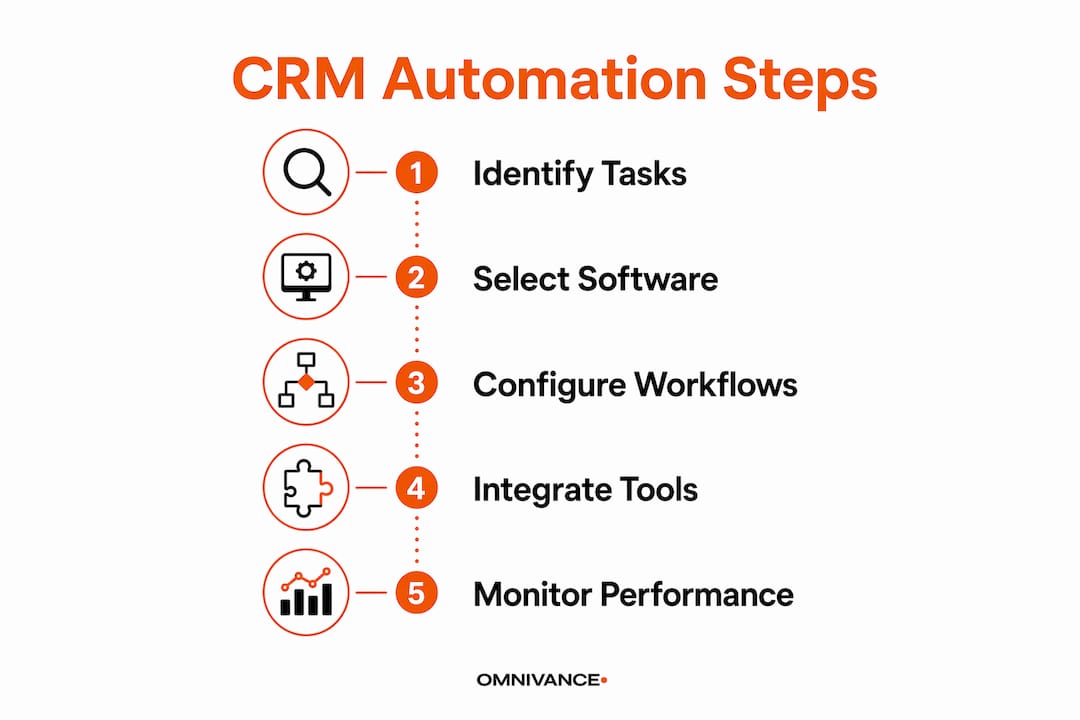
Setting up CRM automation does not require a developer. Most modern platforms use no-code workflow builders where you define a trigger, set conditions, and choose an action. Basic setups take minutes, while advanced AI-driven workflows typically show measurable results within 2–3 weeks. That timeline sets realistic expectations: you will not see full impact on day one, but you will see it quickly.
Follow this sequence to build your first workflows:
- Audit your current process. Write down every step your team takes from first contact to closed deal. Identify where leads fall through the cracks, usually in the follow-up stage.
- Map your trigger events. A trigger is what starts an automation. Common triggers include a new lead form submission, a deal moving to a new pipeline stage, or a quote sitting unopened for 48 hours.
- Define your actions. Actions are what the system does automatically. Examples include sending a follow-up email, assigning a task to a sales rep, or flagging a lead as stale after 30 days.
- Build in the no-code editor. Most platforms display triggers and actions as visual blocks. Connect them in sequence, set your timing rules, and save.
- Test before you go live. Run each workflow with a test contact. Confirm the email sends, the task assigns, and the pipeline stage updates correctly.
- Refine after two weeks. Check which automations are firing and which are not. Adjust timing, conditions, or messaging based on real data.
Automations that handle follow-ups and stale lead re-engagement after 30 days are the highest-impact starting points for most small businesses. They address the single biggest revenue leak: leads that go cold because no one followed up in time.
Pro Tip: Use your CRM's built-in reporting to track which automated sequences convert leads at the highest rate. Double down on those workflows before building new ones.
For a broader view of which workflows deliver the most value across a growing company, the 7 essential business workflows guide from Omnivancemedia covers the full picture beyond CRM alone.
What mistakes should you avoid in small business CRM automation?
Most CRM automation failures come from setup errors, not bad software. Knowing the common pitfalls before you build saves weeks of troubleshooting later.
- Tying automations to individual user accounts. Automations linked to a specific user break the moment that person leaves the company. Configure all workflows at the workspace level so they continue running regardless of team changes.
- Skipping the integration step. A CRM that does not talk to your accounting or email tools forces manual data entry, which defeats the purpose of automation entirely.
- Choosing complexity over fit. A platform with 200 features is only valuable if your team uses 20 of them. Unused features create confusion and slow adoption.
- Ignoring cross-platform limitations. Some integrations require API access that not every tool provides. AI-agent tools that interact directly with user interfaces can bridge gaps where native APIs fall short.
Workspace-level automation configuration is the single most overlooked best practice in small business CRM setup. When automations run at the account level rather than the user level, they survive team changes, role shifts, and staff turnover without breaking. This one decision protects months of workflow-building work.
The marketing automation checklist for SMBs is a useful external reference for auditing your setup against proven best practices before you go live.
How do you maximize ROI by integrating CRM with your full tech stack?
CRM automation delivers its highest return when it connects to every tool your business already uses. A CRM that operates in isolation still requires manual updates, which means your team spends time on data entry instead of selling.
| Integration Type | Connected Tool | Key Benefit |
|---|---|---|
| Accounting | Invoicing software | Auto-create invoices when deals close |
| Email marketing | Email platform | Sync contact lists and trigger campaigns |
| Scheduling | Calendar tools | Book meetings directly from CRM records |
| E-commerce | Online store | Pull purchase history into customer profiles |
| Communication | VoIP or chat tools | Log calls and messages automatically |
Integrating CRM with accounting, scheduling, and email eliminates duplicate data and gives your team a single source of truth for every customer relationship. That single source of truth is what makes automation reliable. When data lives in one place, every automated workflow fires with accurate information.
Pro Tip: Before adding a new integration, ask one question: does this connection eliminate a manual step my team takes at least three times per week? If yes, build it. If not, wait.
AI-driven workflow tools now help small businesses overcome API limitations by interacting directly with software interfaces, even when native integrations do not exist. This approach is more advanced but worth knowing about when you hit a wall with standard connectors. For teams ready to connect CRM with email marketing specifically, the CRM and email marketing integration guide from Omnivancemedia covers customer journey mapping in detail.
Key Takeaways
CRM automation for small business works best when workflows run at the workspace level, pricing matches team size, and the CRM connects to every tool in your existing stack.
| Point | Details |
|---|---|
| Start with the right pricing model | Flat-rate plans protect your budget as your team grows and adds read-only users. |
| Build workspace-level automations | Automations tied to individual users break when staff leave; workspace-level workflows do not. |
| Integrate before you automate | Connect your CRM to accounting, email, and scheduling tools to eliminate manual data entry. |
| Match the tool to your team size | Enterprise platforms slow small teams down; choose a platform sized for your current operation. |
| Test and refine within two weeks | Advanced AI-driven workflows show measurable results in 2–3 weeks; use that data to improve. |
What I've learned from watching small businesses implement CRM automation
The most common mistake I see is not choosing the wrong software. It is choosing the right software and then setting it up wrong. A business owner spends weeks evaluating platforms, picks a solid one, and then ties every automation to their own user account. Six months later, they hire a new sales manager, and half the workflows stop firing. Nobody notices for two weeks. That is a real cost.
The second pattern I see constantly: owners buy a platform with 150 features because they plan to use them all "eventually." They use eight. The other 142 create a cluttered interface that new hires find confusing, which slows adoption and kills the ROI they were chasing.
My honest advice is to start with three automations: a new lead welcome sequence, a 48-hour follow-up reminder, and a 30-day stale lead re-engagement trigger. Those three alone will recover more revenue than most small businesses realize they are losing. Get those working cleanly, measure the results, and then add complexity. The businesses I have seen succeed with CRM automation all share one trait: they built simple systems first and added layers only after the foundation was solid.
The what does a CRM do for small business resource from Omnivancemedia is a good starting point if you are still clarifying what problem you are actually trying to solve before choosing a platform.
— laya
How Omnivancemedia supports your CRM automation setup
Small business owners who want CRM automation done right, without months of trial and error, work with Omnivancemedia for exactly that reason.
Omnivancemedia builds CRM setup and integration systems tailored to small business operations, not enterprise templates. The team handles workflow configuration, cross-platform integration, and ongoing refinement so you are not troubleshooting automations at 10 PM. Clients who combine CRM automation with Omnivancemedia's paid advertising and SEO services see compounding returns because every channel feeds the same pipeline. If you are ready to see what a fully connected marketing and CRM system looks like for your business, the full services overview is the right place to start.
FAQ
What is CRM automation for small business?
CRM automation for small business is the use of software to handle repetitive customer management tasks automatically, including follow-up emails, lead scoring, and pipeline updates. It frees your team from manual work and reduces the chance of leads falling through the cracks.
How long does it take to set up CRM automation?
Basic automations can be configured in minutes using no-code workflow builders. Advanced AI-driven workflows typically show measurable results within 2–3 weeks of deployment.
What is the cost of CRM software for small businesses?
Pricing ranges from flat monthly fees of $299–$499 to per-user fees of $9–$19 per month. Flat-rate models are generally better for growing teams because they do not penalize you for adding users.
Why do small business CRM automations fail?
The most common cause is tying automations to individual user accounts rather than the workspace. When that user leaves, the automations stop. Configuring workflows at the workspace level prevents this problem entirely.
Do I need a developer to automate my CRM?
No. Most modern CRM platforms include no-code workflow builders that use visual drag-and-drop editors. A developer is only needed for custom API integrations or advanced AI-agent setups.